The Ultimate Guide to Choosing the Right AI Platform
Dec 21, 2025
First things first: decide what tools you want or need to use in your pipeline. This choice will determine your next steps and make the decision-making process much easier.
Below, we’ve put together a comparison of the most popular AI platforms with their pros and cons. We based this on our own pipeline and the tools we use in our process. This list may change in the future, as AI tools evolve and become outdated very fast these days, but at the moment of this publication, here is how it looks:
Our Current Pipeline
Image Generation: We use Midjourney and Nano Banana Pro. This is our go-to image generation pack that covers 99% of our tasks. We also add Seedream 4.5 as an alternative, though we personally prefer Nano Banana Pro.
Upscaling: With new Nano Banana Pro and Seedream models and their 4k generations upscale is not necessary for most of the shots. Sometimes we still use Magnific to enhance details and texture (especially skin textures), but it’s not must have tool as it was a couple month ago. Topaz Image Upscaler is an alternative to Magnific; it is definitely not as powerful, but it still provides decent results.
Video Generation: Our go-to tool is Veo 3.1, but we use Kling as well when it comes to complex transitions or dynamic scenes. We’ve included other top-tier tools in the list like Sora 2, Runway Gen-4, Wan 2.5, and Minimax Hailuo 2.3. We use these occasionally to try different options or for special needs (like VFX, which is the strongest side of Hailuo 2.3), so it’s good to have them in the toolkit.
Video Enhancement: Of course, when talking about Veo 3.1, you will need an upscaler combined with an enhancer. The native Veo upscaler is not a tool that helps you achieve high quality, so we always use Topaz Astra for this purpose—it’s an important part of the process. You might not need it when generating everything in Kling, but it is very helpful to have regardless.
Sound: Last but not least—Sound. Even though Veo and Kling are able to create dialogue and sound, the quality is quite questionable, especially when you want to keep consistent voices for your characters. The number one tool in this field is ElevenLabs with their library of voices, sound FX, and options to create custom voices or replace existing ones. They also have a music generation tool, which is still worse than Suno (the King of music generation tools) but helps get the job done. However, even a subscription to ElevenLabs might not be enough, so it’s good to have a decent sound effect and music library like Artlist.io or Epidemic Sound.
This is the toolkit we want to use as a foundation for the comparison. Of course, there are a lot of custom, open-source models for both image and video generation, but in our experience, they can’t provide the same results as the ones described above.
Platform Availability Table
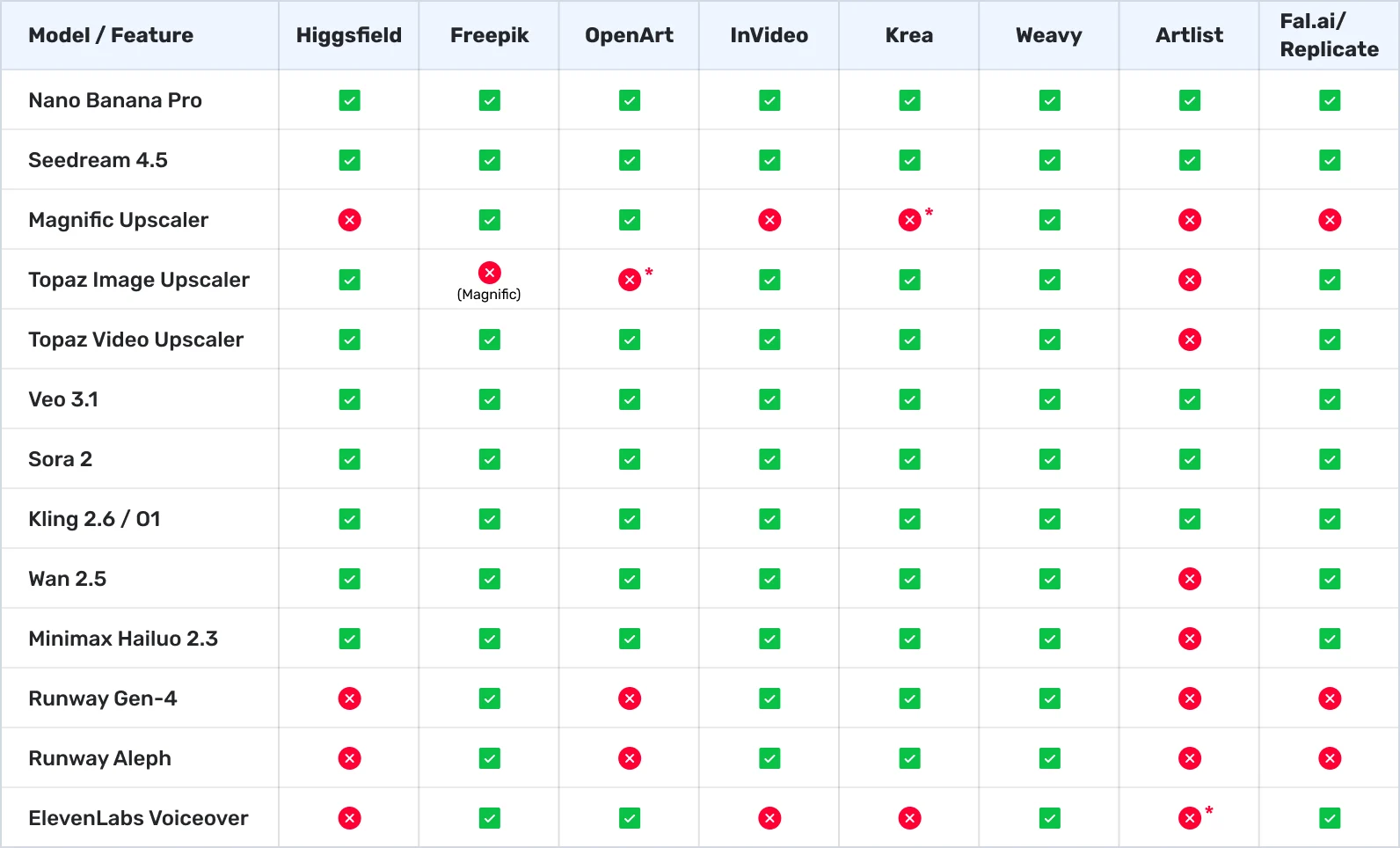
*the platform has their own analogy
Detailed Platform Reviews
Now that we have the overview, let’s dive deeper to see the pros and cons of each platform.

Higgsfield
Higgsfield positions itself as an AI-first video and image studio designed for cinematic workflows, featuring text-to-video, sketch-to-video, lipsync, and character swaps. The platform hosts a variety of high-end models including Veo, Kling, Sora, Minimax, Seedance, and Wan, alongside multiple photorealistic image models like Nano Banana Pro and Seedream. Quite often, they have limited offers for unlimited generations on video tools like Kling or Wan, which is a great opportunity to really test each model. They also give you unlimited image generation access for Nano Banana Pro (up to 2k) and Seedream 4.5 (up to 4K) for the rest of the year on any tier higher than basic.
Aside from that, Higgsfield has a lot of its own tools for image/character generation and video effects, but in our opinion, they are more useful for advertising than for short film creation. The downside of the platform is that it's quite difficult to browse and structure generations; the only way to organize is via separate folders.
- Pros:
- Good selection of the main models.
- Unlimited offers for image and video generation tools.
- Reasonable pricing for the value.
- Cons:
- Some tools like ElevenLabs or Magnific Upscaler are still missing.
- Impossible to filter already generated content, aside from searching for keywords.
- Doesn’t have audio/music generation tools.
Verdict: A solid middle-ground solution for AI filmmaking.
Freepik (AI Suite)
Freepik serves as an all-in-one creative ecosystem that combines an image generator, editors, and a massive stock asset library. It aggregates a wide range of back-end models—including Flux, Ideogram, Runway, Google Imagen, GPT Image, Seedream, and Mystic—with video capabilities via Kling, Veo, and Wan available on specific plans. Pricing is highly accessible, starting around $5.75/mo for general access, while higher "Premium+" tiers offer massive credit allocations (up to 3.6 million credits/year) and "unlimited" generation on selected models. This makes it an ideal choice for users who want a high-volume asset factory that blends generative AI with traditional stock resources.
- Pros:
- All-in-one solution with everything you may need.
- With the introduction of node-based "Spaces," it becomes a tool with extremely varied pipelines for generation.
- Flexible pricing with a lot of different options.
- Beginner-friendly interface with a lot of guidance.
- Big asset and stock library.
- Cons:
- Quite expensive to use as a video generation platform on a daily basis.
- "Unlimited" image generation has a limit of 1,000 images per month (for Premium+ users) at full speed; after that, generation speed slows down significantly.
Verdict: Probably the most versatile platform, but not the cheapest for video generation.
OpenArt
OpenArt is a community-centric platform focused primarily on image generation and simple video tools, offering a low barrier to entry for hobbyists. It supports SDXL, various Stable Diffusion presets, and its own "OpenArt Creative" models, with a unique feature allowing users to train their own personalized models. The pricing model is freemium-friendly, with a free tier (limited by resolution) and paid plans starting at approximately $7/mo. It is best suited for experimentation and users who want to explore community-trained models or create their own custom styles without heavy infrastructure.
- Pros:
- Has all the main models and many instruments for image/video generation and editing.
- A lot of custom/open-source image models and tools to control them (you can even train your own model).
- Has voiceover tools as well.
- Reasonable pricing for video generation.
- Cons:
- Nano Banana Pro is not unlimited compared to other platforms.
- Unlimited deals are only available for the highest-tier plan.
Verdict: A solid platform primarily oriented toward image generation. Good for starting your AI journey and trying different models, but not the best value pick for AI filmmakers.
InVideo
InVideo is a marketing-focused platform designed for streamlined, template-driven video production (ads, social clips, text-to-video). Rather than granular model control, it integrates AI assist tools directly into a timeline editor. It partners with various providers to offer models like Kling, often structuring access through promotional windows (e.g., "Unlimited Kling" for a limited time). Pricing includes Free, Business, and Unlimited tiers, with aggressive promotions such as "Unlimited images for 365 days" on paid plans. It is the go-to tool for users who need finished video products quickly rather than raw generative clips.
- Pros:
- Has all of the main models.
- Full of templates and effects to create your video in one click or add effects and transitions.
- Cons:
- Probably the most expensive platform for video generation.
- More suitable for commercial creation and VFX than for full short film creation.
Verdict: An interesting approach with a focus on VFX and templates. Can be used as a post-production platform, but way too expensive to use as a main video generation platform.
Krea
Krea is a multi-purpose creative suite known for its exceptional speed and "Real-time" generation capabilities. It offers native 4K outputs and fine style control with over 1,000 presets, claiming generation speeds as fast as ~3 seconds for Flux images. The platform integrates Flux, ChatGPT image variants, Imagen, Ideogram, and Runway Gen models, along with its own internal implementations. With both free tiers and scalable paid plans for teams, Krea is optimized for artists and designers who prioritize fast iteration, high-resolution output, and fluid style switching.
- Pros:
- Has all the main models and many instruments for generation and editing.
- Has a node-based environment for building workflows.
- Reasonable pricing.
- Beginner-friendly, simple, and clean interface with guidance.
- Cons:
- Quite expensive to use as a video generation platform on a daily basis.
- Doesn’t have any unlimited deals compared to other platforms, which may end up quite pricey.
- Doesn’t have audio/music generation tools.
Verdict: A simple, beginner-friendly platform with a good amount of tools. Good for beginners, but the lack of unlimited deals and voiceover tools makes it less attractive than competitors.
Weavy
Weavy acts as a professional, node-based workflow layer for teams, allowing users to chain together multiple external models inside a collaborative editor. It aggregates a massive list of top-tier models, including Nano Banana Pro, Veo 3, Kling, Seedream, Minimax Hailuo, Wan 2.5, Runway Gen-4, ElevenLabs, various upscalers, and many other tools. It is designed for professional teams that need a single, unified interface to access and automate the best AI models on the market. Weavy is one of the best tools to build complex workflows and allows you to easily see the whole picture because of its node-based structure. You can also integrate any custom model using an API from platforms such as fat.ai or replicate.com and utilize a pay-per-use payment structure.
The pricing is transparent and credit-based, with a free tier (150 credits/mo) and a Starter tier around $24/mo (1,500 credits), where credits map directly to image counts or video seconds.
- Pros:
- Very versatile model list with everything you may need (including LLM models and editing tools).
- Great for building workflows and using different tools while keeping everything in one place.
- Reasonable and clear pricing for the value.
- Custom models integration.
- Cons:
- Doesn’t have any unlimited deals compared to other platforms, which may end up being pricey.
- Quite expensive to use as a video generation platform on a daily basis.
- May be confusing and hard to start for someone not familiar with node-based workflows.
Verdict: The best, but definitely not the cheapest, tool for building professional workflows with access to the most AI tools.
Artlist
Artlist has expanded beyond stock assets into a full-fledged "Editor's Suite," integrating the industry’s most powerful generative models directly into a filmmaker's workflow. It hosts a massive lineup including Sora 2, Veo 3.1, Kling O1 / 2.6, Nano Banana Pro, and Seedream 4.5, allowing users to generate high-fidelity video and images without leaving the platform. The platform emphasizes "production-ready" consistency, offering specialized tools like Kling O1 for start/end frame control and character consistency, as well as native audio generation for synced dialogue and sound effects. With features like Voice Cloning, AI Color Grading, and a vast library of royalty-free music and footage, Artlist allows creators to mix real stock assets with AI-generated "missing links" in a seamless, commercially safe environment. It is important to mention that AI generation is treated more like an additional service than the primary one, which makes the pricing for generation probably the most expensive among all platforms.
- Pros:
- Big variety of stock footage, music, sound effects, and even LUTs.
- Their own AI voiceover generator.
- Has main image and video models.
- Cons:
- Doesn’t have any upscale tools.
- Limited model choice.
- The most expensive platform to generate images or video.
- No control over image generation resolution.
Verdict: Way more suitable for artists looking for stock footage than for AI creators. Very limited number of models with a high price per video.
Fal.ai
Fal.ai is the speed demon of the industry. Originally built as a developer-first platform for running AI models at lightning speeds, it has become a secret weapon for power users who want "raw" access to the latest tools without the fluff. It hosts an incredibly vast library of models, including Flux, Kling, Veo, Wan, and Minimax Hailuo, often adding new models (like Nano Banana Pro and Seedream) mere hours after their release. Unlike the other platforms on this list, fal.ai operates on a purely pay-as-you-go model. You pay only for the compute time or megapixels you use, which makes it perfect for specific, high-end tasks where you don't want to commit to a monthly subscription. While it lacks a traditional "video editor" interface, its generation speeds are often 2x to 4x faster than competitors.
- Pros:
- Incredible Speed: Hands down the fastest generation times on the market.
- Day 0 Access: Often the first platform to host new open-source and closed-source models.
- Pay-As-You-Go: No monthly subscription required; you only pay for what you generate.
- Raw Quality: Gives you granular control over model parameters that other simplified platforms hide.
- Cons:
- No "Studio" Features: It is a generation playground, not an editing suite; you will need to assemble your clips elsewhere.
- Technical UI: The interface is cleaner now but still more oriented toward developers or technical users than filmmakers.
- Costs Can Add Up: Without an "unlimited" plan, heavy experimentation with video can get expensive quickly.
Verdict: The best choice for power users who want instant access to the bleeding edge and prefer paying for usage rather than a subscription.
Pricing and Choosing the Right Plan

After discovering each of them, let’s talk about pricing and how to choose the right plan for your needs.
When we talk about AI filmmaking, it means you need a lot of generations, especially at the start when you are looking for the right tool and workflow. That workflow will depend on what you want to create and how you want to make it.
If your short film is based mostly on dialogue and realistic characters, Veo is your go-to tool, and the best option is the Google Ultra subscription. Yes, it’s pricey, but it will give you unlimited generations for Nano Banana Pro (in 1k quality, which you can either upscale or regenerate in Gemini) and unlimited Veo 3.1 Fast generations. This gives you a solid basis to build the whole short film mainly using only these two tools. Also, keep in mind that Veo is quite pricey on all other platforms, and using it there will burn your credits too fast.
However, if you are looking for a more dynamic story with VFX and a minimum of dialogue — Kling will probably do a way better job with its 1080p out of the box and better physics, especially in dynamic shots. In that case, it’s much better to get a Higgsfield or Freepik subscription with unlimited Nano Banana Pro and a decent amount of Kling generations.
We wouldn’t recommend getting any "Starter" subscription because it’s not going to be enough to even discover the tool. Subscriptions around $25-50 per month will give you enough credits to try different tools and find the one that will be the basis of your pipeline.
Of course, if you want to create professional-looking complex videos, you might need a variety of tools for every step. In our pipeline, we use Midjourney and Nano Banana Pro for image creation, Veo and Kling for video generation, ElevenLabs for voiceovers and voice changing, Epidemic Sound for SFX and music, and Suno if we want to craft something unique. On top of that, we use Adobe Creative Cloud for production and post-production (which can be replaced with the free version of DaVinci Resolve).
Ultimately, there is no single "magic wand" platform that does it all perfectly. The AI landscape is fragmented, and that’s actually a good thing — it forces you to build a custom stack that serves your specific creative vision.
Whether you lean towards the cinematic realism of Veo for dialogue-heavy films or the dynamic energy of Kling for action sequences, the most important step is to stop over-analyzing and start creating. The tools will keep evolving and the "best" model will likely change next month, but your ability to tell a compelling story is what truly matters.
So pick a subscription that fits your budget, experiment with the workflows we’ve outlined, and let your imagination run wild. The best time to start building your portfolio is now.
Want to go beyond weekly updates?
Our AI Filmmaking Course gives you a complete, practical workflow — from writing and design to directing and post-production. We keep the course updated as the tools evolve, so you always stay ahead.